Volunteer training credentials: evidence and renewal workflow
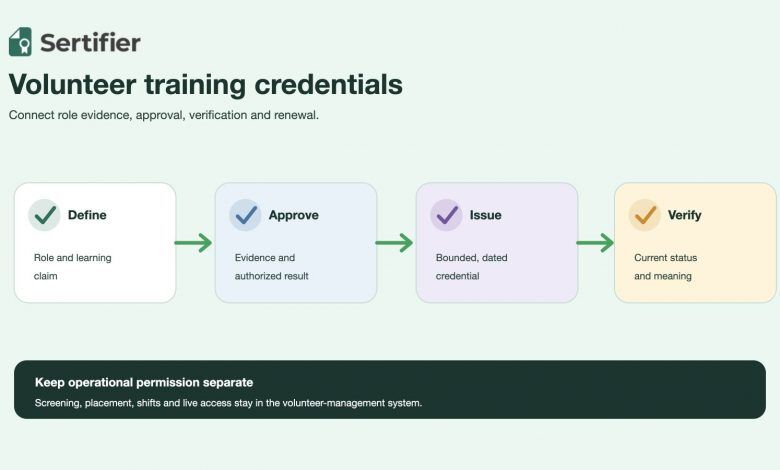
Volunteer training credentials give a nonprofit, school or community program a portable record of what a volunteer learned and what the program approved. They should not turn attendance into competence, replace screening or authorize a person for every volunteer role.
Design the record from the role decision backward. Define the work, publish the training and evidence requirements, keep screening and operational approval in their source systems, issue a bounded credential, and make its current status easy to verify.
Short answer: A volunteer training credential should communicate one approved learning or capability claim. Keep screening, placement, service hours, supervision and live role access in the systems that own those decisions.
Short answer
A reliable volunteer training credential workflow needs eight controls:
- Define the volunteer role and the decision the credential supports.
- Separate orientation, training, assessment and role approval.
- State the exact earning criteria before the program starts.
- Keep sensitive screening and service records outside the public credential.
- Require an authorized approval before issuance.
- Issue the smallest accurate claim with dates and scope.
- Test the recipient and verifier journey with a non-production record.
- Define renewal, correction, role change and departure handling.
The credential is a portable training record. The volunteer-management system remains authoritative for screening, placement, scheduling, service hours and permission to perform the role.
Start with the volunteer role decision
“Volunteer trained” is too broad for an operating rule. A food bank intake volunteer, youth mentor, event marshal and crisis-line volunteer can face very different duties, supervision and safety requirements. Write the decision first: which person is prepared for which role, in which program, after which evidence, through which date, and under whose approval?
The University of Kansas Community Tool Box volunteer training checklist separates training design, delivery and trainee evaluation, and describes training as an ongoing process. Microsoft Learn’s current nonprofit volunteer onboarding module also separates application approval, onboarding, scheduling, attendance and engagement closure. These are useful operating boundaries, not universal legal requirements.
Record the role, program, curriculum version, required evidence, approval owner, validity rule and source system before choosing a badge or certificate.
Separate training from service records
One volunteer journey can contain several valid records. Combining them in one credential creates avoidable ambiguity.
| Record | What it establishes | What it should not establish by itself |
|---|---|---|
| Application and screening record | The program completed its required intake checks | Training completion or current role permission |
| Orientation record | The volunteer received mission, policy and local-context information | Skill, assessment or supervised practice |
| Learning record | Required modules or sessions were completed | That the person can perform every task safely |
| Assessment and approval record | Named evidence passed the program’s acceptance rule | Permanent authorization across roles or locations |
| Digital credential | A portable, verifiable training or capability claim | Service hours, background-check details or live scheduling permission |
| Volunteer-management record | Current placement, supervision, shifts and service history | Ownership of the volunteer’s portable learning record |
The current Sertifier credential type guide lists course completion, competency-based achievement, participation and volunteer experience as different credential types. Use the type that matches the evidence. A training credential should not silently become a volunteer experience or service-hours record.
For service recognition, wording and hours, use the existing volunteer certificate template guide. This guide owns the program-level training evidence and approval workflow.
Match the claim to the evidence
Use the lowest claim strength that the program can defend. Attendance may be important, but it does not prove knowledge or role readiness.
| Claim | Minimum supporting evidence | Overclaim to block |
|---|---|---|
| Orientation participation | Recorded attendance or completed orientation activity | Implies role readiness |
| Training completion | All published modules and activities completed | Implies an assessment was passed |
| Knowledge | Approved assessment against named objectives | Implies safe performance in a live setting |
| Demonstrated skill | Observed task, simulation or practical assessment against criteria | Expands beyond the task and conditions assessed |
| Current role readiness | Required evidence plus authorized operational approval | Replaces screening, supervision or live assignment controls |
Sertifier’s current credential campaign guide documents title, description, skills, earning criteria, expiry and supporting documents as available credential-detail fields. Put a clear public summary in the credential, but keep restricted assessment responses, screening results and personal case information in approved source systems.
Design role-based requirements
Start with one role rather than one organization-wide volunteer badge. A useful requirements map can include:
- Mission and conduct: program purpose, code of conduct and escalation routes.
- Task knowledge: role steps, limits and who can approve exceptions.
- Safety: only the policies and procedures relevant to the role and location.
- Data handling: what may be collected, viewed, shared or recorded.
- Practical readiness: simulation, shadowing or supervised demonstration when
- Local approval: supervisor confirmation before the volunteer receives live
the role requires it.
access or an assignment.
SCORE’s current volunteer training and onboarding is a concrete example of role-oriented onboarding, ethics and mentor training. Its exact curriculum belongs to SCORE. The transferable lesson is to connect training modules to the work the volunteer will actually perform.
Build an evidence and approval workflow
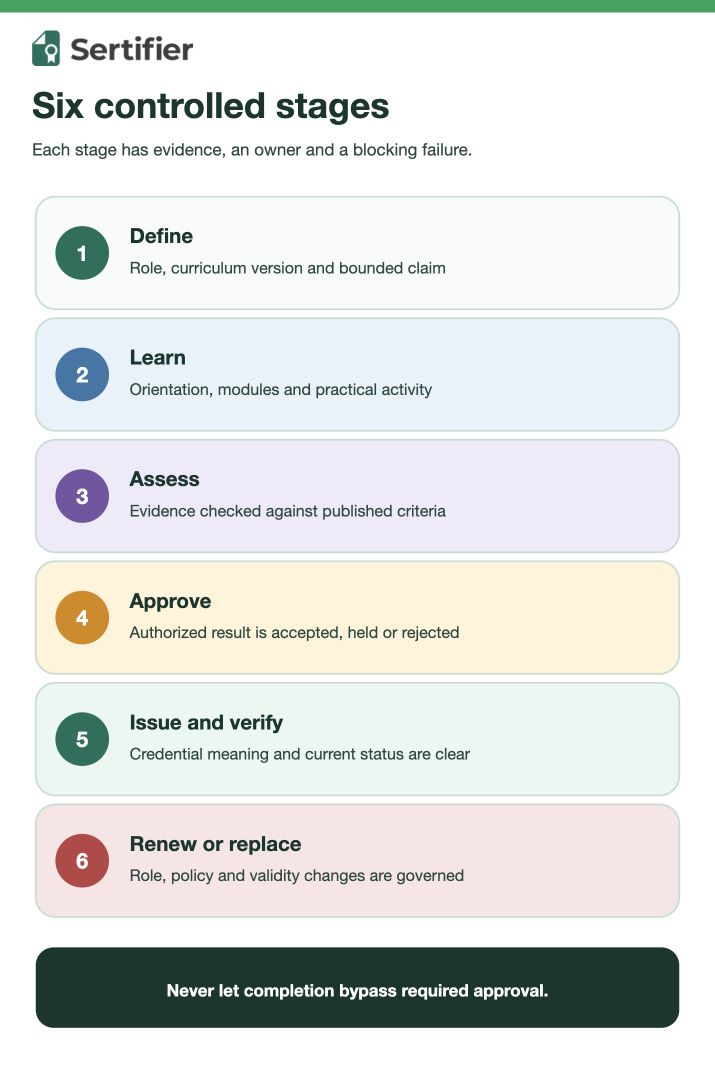
Use a controlled sequence so a course-completion event cannot bypass a required assessment or supervisor decision.
- The program publishes the role, curriculum version and earning criteria.
- The volunteer completes the required orientation and training activities.
- The learning system records attendance, completion and assessment evidence.
- A named owner accepts, rejects or holds the evidence.
- The volunteer-management system confirms any separate screening and local
- One credential is issued for the approved training or capability claim.
- The recipient accesses it and an external reviewer checks its meaning and
- Renewal, correction, role change or departure updates the operational
readiness requirements.
current status.
decision without rewriting history.
Sertifier’s current automation documentation describes scheduled issuance, integrations triggered by external activity and Pathways with prerequisites. Automation should act only on an approved result. It does not define whether the training evidence is sufficient.
Use pathways only after requirements are clear
A multi-step volunteer program may benefit from separate credentials for orientation, task knowledge, supervised practice and current role readiness. Do not create extra badges merely to make a pathway look complete.
Sertifier’s current Pathways documentation describes connecting credential campaigns, setting prerequisites, tracking progress and optionally issuing the next credential after prerequisites are met. Map those controls to real program gates. Keep live role assignment and permission in the volunteer-management system.
Define expiry and renewal deliberately
Use expiry when the underlying curriculum, policy, skill or role approval is time-bounded. Do not expire a historical participation record only to create renewal activity.
Sertifier’s current expiry documentation describes fixed and recipient-specific expiry dates, visible expired status and reminder options. Configure them only when they match the program’s real rule.
Define what happens when:
- A policy or curriculum version changes.
- A volunteer moves to a different role or location.
- A time-bounded safety or role credential approaches expiry.
- The person renews before or after expiry.
- The program discovers incorrect identity or evidence.
- The volunteer leaves and later returns.
An expired credential can remain accurate history. It should not be treated as current role permission after the validity rule ends.
Protect volunteer and community data
Publish only what a recipient and verifier need to understand the claim. A public credential normally does not need background-check results, medical information, beneficiary details, incident reports, home addresses or internal case notes.
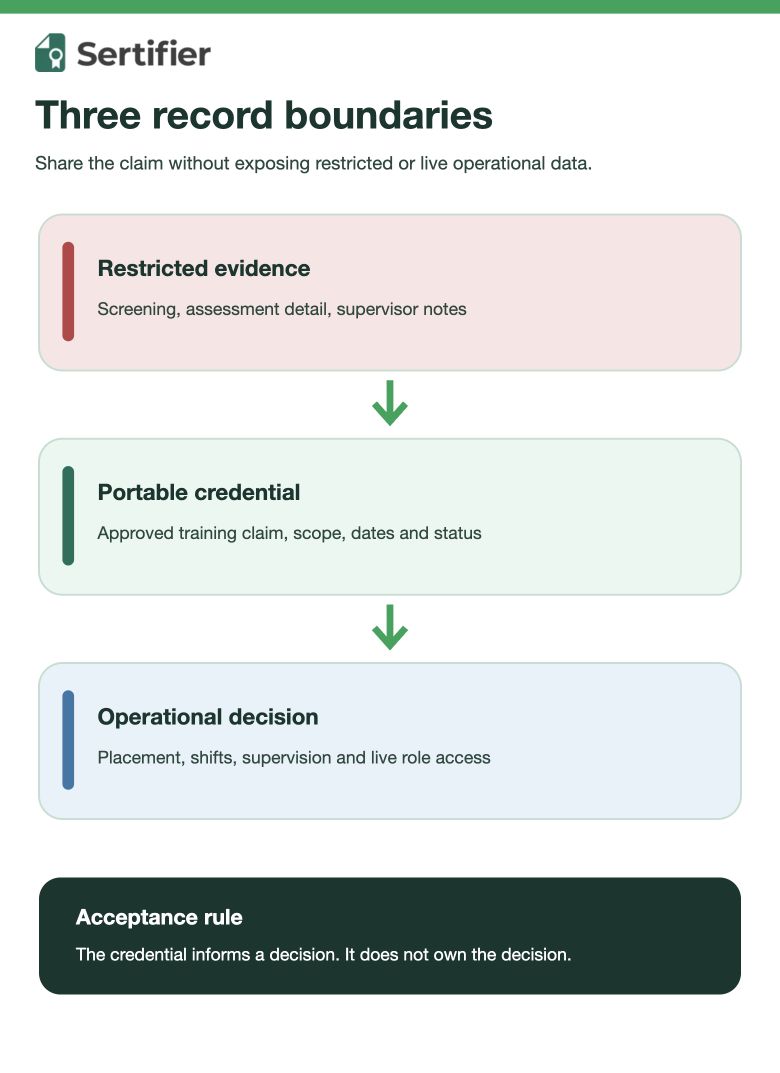
Keep three boundaries explicit:
- Public credential: issuer, recipient, role or learning claim, criteria,
- Restricted evidence: assessment records, supervisor observations and
- Operational controls: screening, placement, scheduling and live role access
scope, dates and current status.
correction history under the program’s access rules.
in the systems that own those decisions.
This is a data-minimization design principle, not legal advice. The organization must apply the laws, safeguarding duties and retention rules relevant to its jurisdiction and community.
Test the real verification journey
Ask someone outside the credential team to open the exact record and answer:
- Who earned it and who issued it?
- Which volunteer role, program and curriculum version are in scope?
- Does it prove participation, completion, knowledge, skill or current role
- What criteria and approval event support the claim?
- Is it current, expired, replaced or historical?
- Which decisions remain in the volunteer-management system?
- Where should a questionable record be escalated?
readiness?
Sertifier’s current verification-page documentation describes a branded verification destination and custom-domain option. Test a normal external route rather than assuming that a PDF, screenshot or social post communicates current status.
Use this pre-issuance acceptance checklist
| Gate | Acceptance evidence | Blocking failure |
|---|---|---|
| Role | Named program, task and curriculum version | Generic “volunteer trained” claim |
| Criteria | Published activities, assessment and approval requirements | Attendance silently substitutes for readiness |
| Evidence | Source record and retention owner are named | Sensitive screening or case data is published |
| Approval | Accepted, rejected and held results are distinguishable | Issuance happens before the authorized decision |
| Credential | Claim, scope, dates, issuer and status are clear | Service hours or broad authorization are implied |
| Lifecycle | Correction, expiry, renewal and role-change rules exist | Old training remains active after requirements change |
| Verification | External reviewer can interpret the current record | Only a static image or forwarded file is available |
| Operations | Placement and live access remain in their source system | Credential alone unlocks a volunteer assignment |
Run the checklist with a non-production record. Save the source evidence, approval outcome, issued fields and verification observation separately.
Measure the layers separately
Do not use credentials issued as proof that volunteer services improved or that the program created community impact.
- Learning layer: starts, completions, assessment outcomes and evidence quality.
- Credential layer: approved, issued, delivered, viewed, expired, corrected
- Volunteer layer: screened, placed, active, supervised and retained people
- Service layer: shifts, hours and program outputs from operational records.
- Impact layer: outcomes only from the program’s defined evaluation method.
and replaced records.
from the volunteer-management system.
Each layer answers a different question. Join them only with a documented, privacy-aware identifier and measurement rule.
Build a verifiable volunteer training workflow
Map the role, evidence, approval, credential status and renewal rule before automating issuance.
Frequently asked questions
Is volunteer orientation enough for a credential?
It can support a participation or orientation-completion record. It should not claim knowledge, demonstrated skill or current role readiness unless the program collected and approved the evidence required for that stronger claim.
Should volunteer training credentials expire?
Use expiry when curriculum, safety procedures, role approval or another underlying requirement is time-bounded. Historical participation may remain valid as history without representing current readiness.
Can a credential replace volunteer screening?
No. Screening, safeguarding, placement and live role access stay in the systems and processes that own those decisions. The credential communicates a bounded training or capability claim.
Should volunteer service hours appear on the training credential?
Only when service hours are part of the exact approved claim and the program can verify them. Usually training evidence and service recognition are clearer as separate records. Use the volunteer certificate guide for service-hour and appreciation formats.