What is a digital credential: 2026 guide for issuers
Reviewed by Arda Helvacılar, CEO of Sertifier, a platform that has issued more than 10 million digital credentials across 70+ countries. Last updated July 2, 2026.
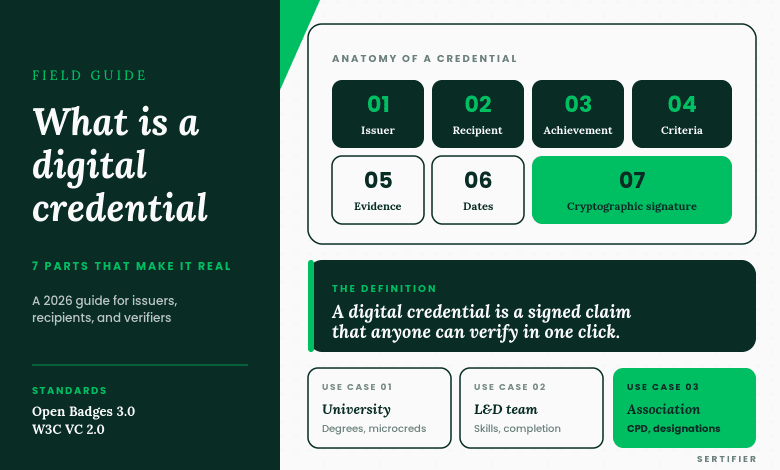
A digital credential is a verifiable record of an achievement, skill, or qualification, issued by an organization and held by a recipient. Unlike a printed certificate, it can be cryptographically verified by anyone with the link or QR code, in seconds, without contacting the issuer.
This guide is written for the people who issue credentials: training providers, higher education programs, professional associations, corporate L&D teams, and event organizers. It covers what a digital credential is, how verification works, the five types you will actually encounter, where digital credentials are used today, the business case for switching from PDFs, and a step-by-step path to issuing your first one.

The short answer: what a digital credential is
A digital credential is a piece of structured, machine-readable data that asserts a recipient earned something specific from a specific issuer at a specific time. It has three parts: the claim (what was earned), the issuer’s identity (who issued it), and the verification method (how anyone can check it is real).
That third part is the difference between a digital credential and a JPEG of a certificate. A digital credential carries the proof of its own authenticity. Anyone with the link or the credential file can confirm it without phoning the registrar’s office.
Sertifier issues digital credentials as both certificates (formal, document-shaped) and badges (compact, designed for social sharing). Both follow the same verification model.
Digital credential vs a PDF certificate
A digital credential differs from a PDF certificate in three ways: it includes machine-readable metadata about the achievement, it links to a verification page maintained by the issuer, and it can be shared as a one-click LinkedIn post or wallet entry.
A PDF can be forged with a few minutes of work in any image editor. A digital credential cannot, because the verification link points back to a record that only the issuer controls.

| Attribute | PDF certificate | Digital credential |
|---|---|---|
| Verifiable by employer | No, unless they call the issuer | Yes, one click |
| Easy to forge | Yes | No, signature would not match |
| Includes machine-readable metadata | No | Yes (skill, level, date, criteria) |
| Shareable on LinkedIn with one click | No | Yes |
| Tracks recipient engagement | No | Yes (opens, shares, views) |
| Standardized format | No | Yes (Open Badges, W3C Verifiable Credentials) |
The standardization matters more than it sounds. A PDF certificate is a snowflake: every issuer designs their own, employers and ATS systems cannot parse them, and a recipient cannot import them into a single wallet. A digital credential follows an open specification, which is what makes downstream sharing, verification, and aggregation possible.
How verification actually works
When an issuer creates a digital credential, the credential is digitally signed by the issuer’s private key. The signature is mathematically tied to the credential’s contents. Change a single character in the credential, and the signature no longer matches.
Anyone can verify a credential by:
- Opening the verification link or scanning the QR code on the credential.
- Reading the credential’s claim (who earned what, from whom, when).
- Confirming the signature checks out against the issuer’s public key.
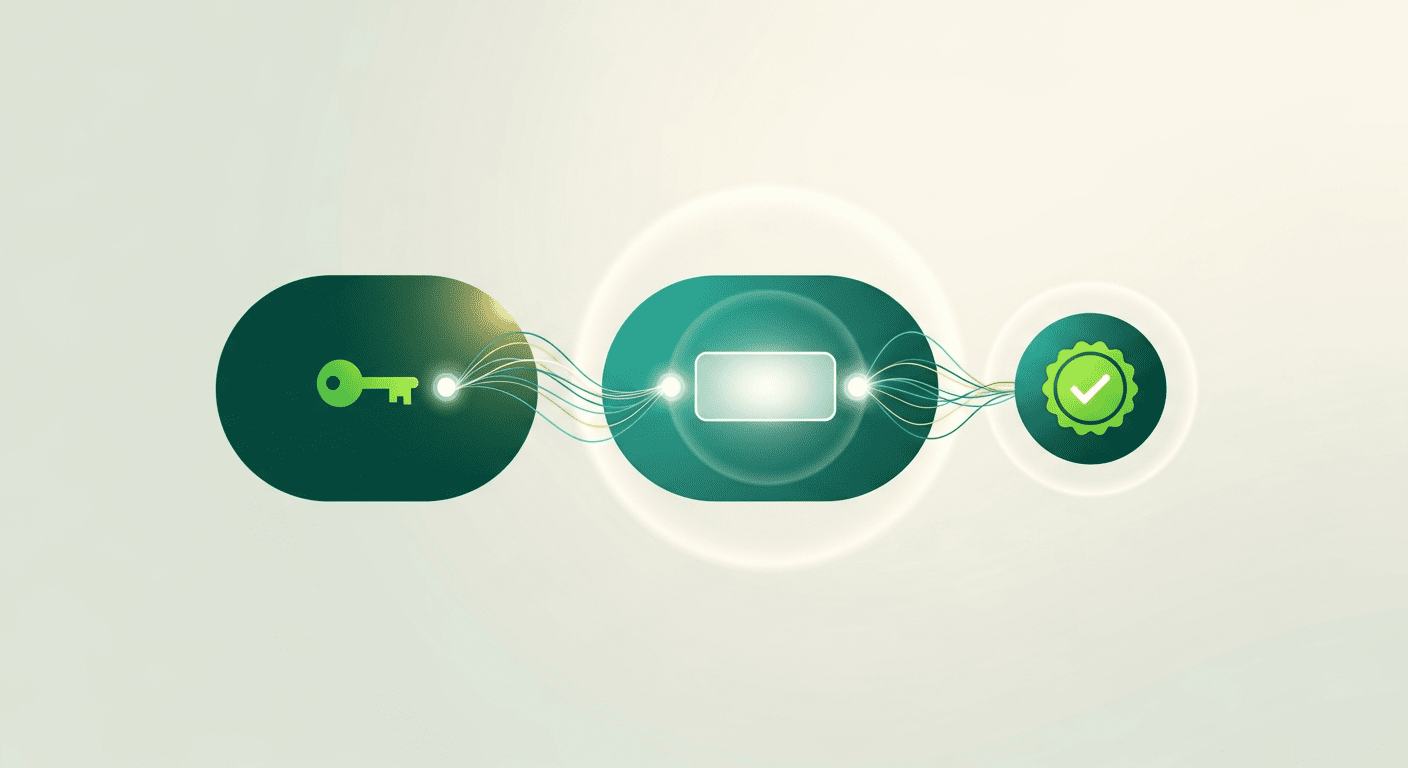
The verification page is hosted by the issuer (in Sertifier’s (Sertifier’s certificate template library) case, by sertifier.com), which means it inherits the issuer’s domain trust. An employer verifying a credential on stanford.sertifier.com knows Stanford issued it because the page lives on a Stanford-controlled subdomain. Blockchain anchoring (see the blockchain credentials post for detail) adds a second layer of permanence: even if the issuer’s verification page goes offline, the cryptographic proof remains on-chain.
The five types of digital credentials
Most issuers use one or two of these. A few use all five.
1. Certificates of completion
The most common. Issued when a recipient finishes a course, a training program, or a continuing education unit. Used by training providers, universities, and corporate L&D programs. Format: looks like a traditional certificate, but includes the verification link and metadata.
2. Digital badges
Compact, visually distinctive, designed for sharing. Used for skill recognition, event attendance, conference participation, and microcredentials. Format: a square or hexagonal image with embedded metadata. Recipients display them on LinkedIn, in email signatures, or on personal sites.
3. Microcredentials
Smaller-scope credentials that recognize a single competency, often stackable into a larger qualification. Used in higher education continuing education programs, in corporate skills frameworks, and increasingly by professional associations as continuing-education recognition. Format: similar to a badge or certificate, but usually paired with explicit criteria (what the recipient did to earn it).
4. Verifiable transcripts and records
Long-form records of multiple credentials, like an academic transcript or a continuing-education history. Used by registrars and certification bodies. Format: a structured document listing every credential the recipient has earned from the issuer.
5. Professional licenses
Time-bounded credentials that require renewal, often tied to regulatory frameworks. Used by certifying bodies in fields like healthcare, finance, and skilled trades. Format: a credential with an explicit expiration date and renewal criteria.
Most platforms can issue any of these. The choice usually depends on how the recipient will use the credential, not on what the issuer wants to call it.
Where digital credentials are used today
Four use cases drive most of the volume.
Corporate L&D and HR
Internal learning programs, compliance training, onboarding completion, manager development tracks. Recipients use the credentials to demonstrate completed training to their HR record and to share on LinkedIn for skill visibility. Volume per organization usually ranges from 500 to 100,000 credentials per year.
Higher education and continuing education
University microcredential programs, executive education completion certificates, continuing-education credits for licensed professions. Particularly important in the EU because of Europass compatibility, which lets recipients carry credentials between EU institutions and employers. Volume usually ranges from 1,000 to 30,000 credentials per year.
Training and certification providers
Independent training companies, technical certification bodies, and skills-assessment providers. Recipients use credentials to prove they passed an external assessment. Volume usually ranges from 500 to 50,000 credentials per year.
Professional associations and event organizers
Membership credentials, conference attendance, CPD records. Recipients use credentials to maintain professional standing and to show employers they attended industry events. Volume varies widely, often 1,000 to 200,000 per year for large associations.
The business case for digital credentials
Three numbers matter when an organization evaluates the switch from PDFs.
Recipient sharing rate
A PDF certificate gets shared on LinkedIn by single-digit percentages of recipients. A digital credential with a one-click LinkedIn integration typically gets shared by 30% to 60% of recipients. Each share is unpaid marketing for the issuer: every recipient who posts the credential introduces the issuer’s brand to their network.
For a training provider issuing 5,000 credentials a year, the difference between a 5% share rate and a 40% share rate is roughly 1,750 additional LinkedIn impressions of the issuer’s brand per year, at zero marginal cost.
Verification cost
A traditional certificate that needs to be verified by an employer creates phone calls and emails to the issuer. A digital credential reduces this cost to zero because the verification page is self-service. For high-verification-volume issuers like professional associations, this is the headline ROI.
Fraud prevention
Forged certificates are common, especially for high-prestige programs. A digital credential is cryptographically signed, which means forgery is detectable in seconds. For programs whose value depends on authenticity (medical certifications, financial licensing, executive education), this is the foundational business case.
How to issue your first digital credential
The first time is the hardest. After that, the workflow is the same regardless of volume.
Step 1: Define the credential
Decide what the credential will say. At minimum: title, recipient name, issue date, criteria for earning it, and the issuer’s name and logo. The criteria field matters more than people expect. “Completed the course” is weak. “Passed a 50-question assessment with a score of 80% or higher, after 12 hours of instruction” is strong, because it tells a future employer what the credential actually represents.
Step 2: Design the visual
The image matters because it is what gets shared. Most platforms include templates; Sertifier offers a certificate maker that produces designs without requiring a designer. The visual should reflect the issuer’s brand and be legible at LinkedIn’s badge thumbnail size.
Step 3: Import the recipient list
A CSV upload of recipient names and email addresses is the standard path. The fields you need: full name, email, and any custom fields like cohort or grade.
Step 4: Issue and deliver
The platform sends each recipient an email with a link to claim their credential. From the recipient’s side: they click, the credential appears in their wallet, and they get a one-click button to share to LinkedIn.
Step 5: Track and iterate
After issuance, watch three metrics: claim rate (percentage of recipients who clicked the email), share rate (percentage who posted to LinkedIn), and verification count (how many times the credential was checked). All three are signals for whether the program is working. Most issuers see claim rates of 70% to 90% and share rates of 30% to 60%; lower numbers usually mean the email subject line or design needs work, not the credential itself.
Frequently asked questions
Is a digital credential the same as a digital badge?
A digital badge is one type of digital credential. The term “digital credential” is the broader category and includes certificates, badges, microcredentials, transcripts, and licenses. “Digital badge” usually refers specifically to the compact, shareable, image-format variant.
Do digital credentials require blockchain?
No. Most digital credentials are anchored to the issuer’s domain and verified by signature, without blockchain. Blockchain anchoring is an optional second layer that adds permanence if the issuer’s verification page ever goes offline. Sertifier supports both. See blockchain credentials for the full explanation.
What standards do digital credentials follow?
Two main specifications. Open Badges 3.0, maintained by 1EdTech, is the dominant standard for badges and certificates. W3C Verifiable Credentials Data Model is the broader, more recent standard that the credentialing industry is converging toward. A well-designed platform supports both, since they overlap rather than conflict.
How much does it cost to issue digital credentials?
It depends on volume and on the platform. Sertifier charges $1 per unique recipient per year above a free tier of 250 recipients, with volume discounts and a 20% discount for nonprofits and accredited educational institutions. See pricing for the current details.
Can I migrate existing PDF certificates to digital credentials?
Yes. The standard approach is to keep the PDF as a historical record and issue a new digital credential for any recipient who still needs verifiable proof. Sertifier supports CSV-based migration where you upload existing recipient lists and the platform reissues them as digital credentials.
Do recipients need an account?
Recipients claim their credential through an email link. Most platforms (including Sertifier) make the account creation optional; the credential and its verification page work without one. Recipients who want to collect multiple credentials in one place can create a wallet account.
How do digital credentials work on LinkedIn?
When a recipient clicks “Share on LinkedIn” from their credential page, LinkedIn pulls the credential’s metadata and adds it to the recipient’s profile under Licenses and Certifications, with a verification link back to the issuer. The whole flow is one click for the recipient.
Related reading
- Digital badges: what they are, and how to use them
- Blockchain credentials: how they work, when they matter
- Define badging: what it means, and why it matters
- What are verified certificates
- Sertifier pricing
For the most granular form of digital credential, see our 2026 issuer guide to micro credentials covering standards, program design, and ROI measurement.
For the broader hiring-market context driving credential adoption, see why skills-based hiring is the inflection point for verifiable credentials in 2026.
For platform selection, see our honest buyer’s guide to digital credentialing platforms in 2026, including where Sertifier falls short.
For the verification side of the credential infrastructure problem, see how to spot a fake academic transcript: 7 verification checks.