How to choose skill labels for a digital credential
Credential skill labels should name the abilities covered by the award in language a reader can understand. Start with the approved program outcomes, select only relevant terms and check them against the earning criteria. Adding a label does not, by itself, prove that a recipient demonstrated that skill.
This guide is for training teams preparing the Skills field before issuing a digital credential. It provides a suggested selection worksheet and fictional examples, rather than a universal skill taxonomy or assessment standard.
What belongs in a credential’s skills field?
A skill label is a short name for an ability associated with the credential. The description explains the program’s purpose and scope; the earning criteria explain what the recipient had to do. Keep these fields consistent without asking a short label to carry the entire award claim.
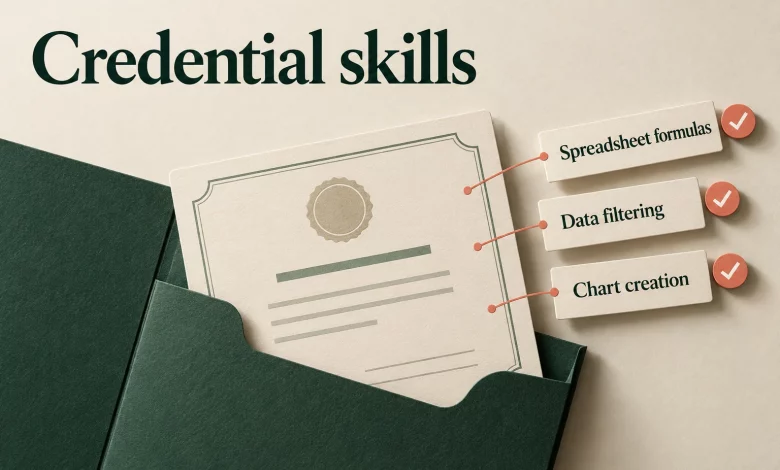
For example, a spreadsheet workshop might cover formulas, filtering and charts. If it only introduced those topics through demonstrations, its description and criteria should say so. Do not turn the same labels into a claim that every attendee passed a practical assessment.
Write the surrounding context with the credential description template, then use the skills field to identify the relevant abilities.
Choose labels from the program outward
- Read the approved outcomes. Use the current syllabus, assessment brief or program definition. Avoid selecting attractive terms before checking what the program covers.
- Identify the actual task. Ask what the learner practised or demonstrated. “Create a spreadsheet chart” gives the reviewer more context than “business excellence.”
- Choose a recognizable label. Prefer an existing term in your approved catalog when it means the right thing. Record a plain-language definition if teams use the same term differently.
- Check the award boundary. A module on one task does not justify a label implying mastery of an entire profession. Keep the description explicit about introductory, completion or assessed scope where applicable.
- Review the set together. Remove duplicates, near-synonyms and unrelated terms. Each retained label should have a clear reason to be there.
A skill-selection worksheet
Use this worksheet internally before entering labels into a credential. These are proposed review fields, not a claim about fields available in the Sertifier interface.
| Review field | What to record |
|---|---|
| Program outcome | The approved activity or ability the label refers to |
| Candidate label | The proposed concise term |
| Scope | What the term includes and excludes in this program |
| Award basis | Participation, completion or the specified assessment requirement |
| Source | The internal catalog or named framework, if one is actually used |
| Decision | Keep, replace or remove, with the reviewer’s reason |
Examples: from broad topics to useful labels
The examples below are fictional program-design examples. Adapt them to the actual course and award requirements; they are not customer results or evidence of a recipient’s competence.
| Program activity | Candidate to reconsider | More specific label to review | Boundary to preserve |
|---|---|---|---|
| Build formulas and filter a practice spreadsheet | Data expert | Spreadsheet formulas; data filtering | Do not imply advanced data analysis |
| Prepare a structured project status update | Leadership | Project status reporting | Does not establish people-management ability |
| Practise a customer-support handoff | Customer success mastery | Support handoff documentation | Describe whether the exercise was assessed |
| Create a chart from a supplied dataset | Business intelligence | Chart creation | Does not imply ownership of an analytics system |
A narrower label is not automatically better. If the program genuinely covers a broader skill, retain the broader term and explain its scope. The decision should follow the program, rather than a preference for longer or more technical wording.
Review suggested skills in Sertifier
Sertifier’s Credential Details guide documents searching for skills by keyword, selecting related suggestions and adding a custom skill when the desired term is unavailable. It also describes AI suggestions based on the credential title and description.
Treat suggestions as candidates. Compare each term with your approved outcomes before selecting it. If a suggestion overstates the course, remove it rather than changing the program description to justify it. Review custom terms for spelling, meaning and consistency with existing labels.
Keep the final list alongside your internal approval record. This makes it easier to explain why a term was chosen when the program changes or another team reuses the credential definition.
Do not confuse labels with framework alignment
A familiar word is not enough to claim alignment with a named competency framework. If your program uses a framework, retain the exact source, concept and version in your internal review. Check the definition as well as the label.
For relationships between maintained frameworks, use the separate skill taxonomy crosswalk guide. The task here is selecting the labels for one credential, not inventing equivalence between frameworks.
Check the reader’s interpretation before issuance
- Can a reviewer connect every label to an approved program outcome?
- Do the title, description and criteria agree about what was completed or assessed?
- Have you removed unsupported proficiency words such as “expert” or “mastery”?
- Are abbreviations understandable to someone outside the issuing team?
- Have duplicate labels and unsupported framework references been removed?
- Does the preview show the intended wording without spelling errors?
- Is the reviewed list preserved with the program’s issuance instructions?
If a label changes the apparent meaning of the award, resolve that question with the program owner before sending credentials. For the wider relationship between claims, assessment and evidence, see the skill badge evidence guide.
Frequently asked questions
How many skills should a credential include?
Use the number needed to describe the approved scope without repetition. There is no recommended count in this checklist. Remove a label if you cannot explain its connection to the program.
Can AI select the skills for me?
It can suggest candidates in the documented Sertifier workflow. The issuing team should still check their relevance and meaning before using them.
Can a completion certificate include skill labels?
Keep the award basis explicit. A label can identify a topic-related ability, but the description and criteria should not imply a passed skills assessment when the award recognizes completion only.
Should I use a custom skill name?
Consider a custom term when the available terms do not describe your program accurately. First check for an existing equivalent and agree on a definition so future issuers use it consistently.
Prepare a credential with clear skill context
Bring your approved title, description, criteria and reviewed skill list into the credential setup. Create your Sertifier account to prepare your team’s digital credentials.