Certificate email templates: subject lines and message examples
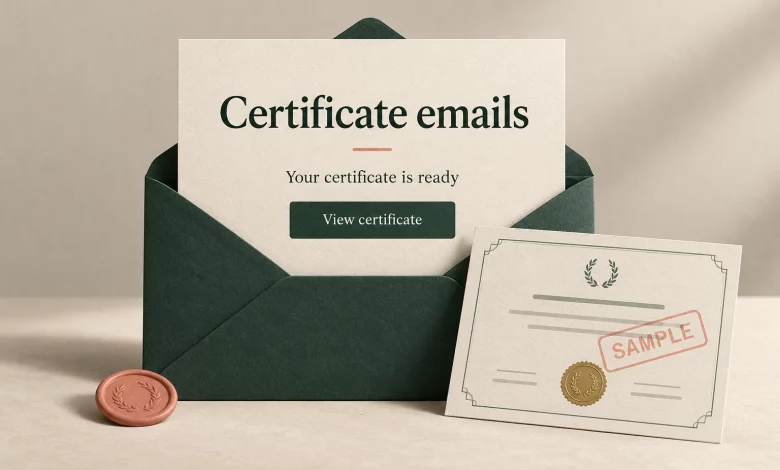
A certificate email should tell the recipient what they earned, who issued it and where to open the credential. Start with that information before adding congratulations, sharing suggestions or other announcements.
Use the subject lines and messages below as editable examples for course completion, attendance and assessed achievements. Match every claim to the credential you actually issued. A notification is not a place to turn attendance into certification.
A certificate email template you can adapt
Bracketed phrases are writing placeholders, not Sertifier attribute syntax. Replace them with approved text or insert the appropriate attribute through your email editor. Configure the credential button with the correct destination rather than pasting a sample URL.
Subject: Your [program name] certificate is ready
Hello [recipient name],
Congratulations on completing [program name] with [issuer name]. Your certificate is ready to view.
Button: View my certificate
Please check your name and the program details. If anything needs correcting, contact [issuer support route].
Thank you,
[issuer team]
Use this version only when completion is the achievement recorded. For attendance, replace the completion sentence with a statement about participation. If the credential represents an assessed skill, name the approved achievement without implying a license or broader qualification.
Choose a subject line that describes the message
These are suggested starting points, not tested performance winners. Put the program or issuer name where it helps recipients distinguish this message from other training notifications.
- Course completion: Your [course name] certificate is ready
- Event participation: Your certificate of attendance for [event name]
- Assessed achievement: Your [achievement name] credential from [issuer name]
- Internal training: [training name]: view your completion certificate
- Corrected certificate: Your updated [program name] certificate is ready
- Requested resend: Your [program name] certificate link, as requested
Use the correction and resend versions only when that is what happened. Do not add “urgent,” “final notice” or a deadline unless there is a real action and an accurate deadline to communicate. A useful editing test is whether the subject still makes sense when read without the email body.
Three message examples for different achievements
The following programs and messages are fictional examples. Replace the details and confirm eligibility before sending.
Course completion
Subject: Your Introduction to Spreadsheet Analysis certificate is ready
Hello [recipient name],
Congratulations on completing Introduction to Spreadsheet Analysis with [issuer name]. Open your certificate to review the course title and your recipient details.
Button: View my certificate
If your name needs correcting, contact [issuer support route].
Thank you,
[issuer team]
This wording records completion. It does not claim that the recipient is an expert, passed an unmentioned assessment or obtained a professional designation. Use the earning criteria guide to make the underlying achievement clear before writing the notification.
Webinar attendance
Subject: Your certificate of attendance for the Project Planning webinar
Hello [recipient name],
Thank you for attending the Project Planning webinar hosted by [issuer name]. Your certificate of attendance is ready.
Button: View my attendance certificate
Please review the event and recipient details. Contact [issuer support route] if you notice an error.
Best regards,
[issuer team]
Do not use “certified project planner” for this example. Attendance and demonstrated competence are different claims. Also confirm that the recipient satisfied your attendance rule; registration alone does not establish that.
Assessment-based achievement
Subject: Your Spreadsheet Data Validation credential
Hello [recipient name],
You have met the requirements for the Spreadsheet Data Validation achievement issued by [issuer name]. Open your credential to review the achievement, earning criteria and recipient details.
Button: View my credential
For a question about the assessment or a correction to your details, contact [issuer support route].
Congratulations,
[issuer team]
Use this message only after the approved requirements have been met. The email should summarize the credential, while the credential page carries its detailed description and evidence where applicable.
Personalize the message without guessing missing information
Create a short mapping before turning a writing template into a reusable email:
- Recipient name: use the approved recipient record, including spelling and characters.
- Program or achievement: use the title on the credential, not an informal campaign nickname.
- Issuer: use the organization responsible for the award.
- Primary action: open the intended credential.
- Support route: provide a monitored route owned by the issuer.
For an absent name, an approved neutral greeting such as “Hello” is preferable to leaving a placeholder visible. Resolve an unknown achievement or destination before sending. Do not guess an assessment result or recipient language.
Sertifier documents the use of system and custom attributes in email bodies in its email personalization guide. Insert the supported attribute through the editor and inspect its rendered value. The brackets in this article are not a promise of automatic substitution.
Keep the credential action easy to identify
Give the main button a label that describes the destination, such as “View my certificate” or “View my credential.” Place optional sharing suggestions after the essential access and correction instructions. Avoid putting a product promotion between the achievement statement and the credential link.
Sertifier’s button customization documentation explains how to change the button text and color within an email template. Its email template guide also covers adding attributes and branding. Check the current editor for the controls available to your template; the copy examples here do not imply that every field supports every attribute.
Review the rendered email before release
- Read the subject and sender together. Confirm the recipient can identify the program and issuer without opening a link.
- Compare the achievement sentence with the credential. Check completion, attendance and assessment wording for agreement.
- Inspect personalization. Check a long name, missing optional data and the actual rendered program title. Do not send literal brackets or editor tokens.
- Open the primary action using a controlled test. Confirm it reaches the intended sample credential and shows the matching issuer and achievement.
- Check narrow and wide email views. Read the message, button and support route; do not rely only on the editor canvas.
- Confirm the support route. Make sure the team receiving correction requests knows which program the message belongs to.
A copy review does not prove inbox placement. For authentication, failed notifications and safe resends, use the separate credential email delivery checklist. Keep notification delivery, credential access and recipient engagement as separate observations.
Frequently asked questions
What should I write when sending a certificate by email?
Name the program and issuer, state the achievement accurately, provide the credential action and explain how to request a correction. Add congratulations where appropriate, but keep the access instructions clear.
Should the email say “certified”?
Use the wording approved for the credential. Completing a course or attending an event should not be rewritten as a certification or license unless that is the actual award.
Can the same message work for every program?
You can reuse its structure, but review the achievement, program title, issuer, action and support route for each program. Do not reuse completion wording for an attendance-only award.
Prepare your credential email in Sertifier
Create your Sertifier account to prepare your credential workflow. Start with one approved achievement and a clear notification, then review the rendered template before sending it to recipients.