LinkedIn badges: what they are and how to add them
Contents
LinkedIn badges at a glance
- A LinkedIn badge is a credential from an external issuer that you can display in the Licenses & certifications section.
- Use the credential name, issuer, issue date, credential ID and verification URL supplied by the issuer.
- A verification link gives recruiters more context than a badge image alone.
- Issuers can use Sertifier to design, issue and track digital badges that recipients can share.
LinkedIn badges are verifiable digital credentials that you display in the Licenses & certifications section of your LinkedIn profile. They are issued by course providers, certification bodies, and digital badge platforms like Sertifier, and each badge links to a credential page where recruiters can confirm what you earned, who issued it, and when. The fastest way to add one: open your profile, click “Add profile section,” choose “Recommended,” select “Add licenses & certifications,” and paste your credential ID and URL. LinkedIn no longer issues its own skill assessment badges, so badges on LinkedIn now come from external issuers.
Therefore, you want to make sure that your talents are communicated effectively and securely to the recruiters and hiring managers you meet. A verifiable badge on your profile does exactly that.
LinkedIn digital badges stand out as one of the ways to do this. Online badges do more than that. They also play an essential role in how educational certifications are distributed and how people document what they learn.
If you don’t have a LinkedIn profile in which you can showcase your online badges, you should create one. Platforms like Sertifier make it easy for individuals and organizations to design, issue, and track online badges, ensuring that your achievements are recognized and verifiable. You can check out our blog on creating certificates with MS Word, and learn how to make a certificate online on your own.
What are LinkedIn digital badges, and how do you showcase them on LinkedIn?
On LinkedIn, you complete your profile to allow the people you communicate with to get to know you better. These are the companies you work for and the clubs you joined at university or high school, the projects you made some of, or a magazine with your article. You do not need to write long articles or explain them in detail to show your skills gained from all these activities and your past. It would be helpful to provide the information from your past as summarized as possible here. LinkedIn digital badges come in handy at this point. With LinkedIn Digital badges, people can present their talents without describing their skills at length.
LinkedIn Digital badges acknowledge and communicate your skills and achievements to the rest of the world. As simply as possible, these badges are digital tools that will enable you to show your previous or new training and skills you have gained and will allow you to do this effectively. Using them makes it possible to reveal your skills that will be lost between the lines. In a nutshell, an online badge is an online affirmation of a person’s skills or knowledge. To go deeper into how these credentials work, read our overview of digital badging.
The importance of online badges and their potential to benefit your career
Online badges are attractive because they offer more personal and non-traditional opportunities to measure learning. Online badges have been used to record and represent skills in the workplace for many years. They can be used to profile achievements in areas such as education, experience, or skill development. These badges are usually shared with the completion of quests or assessments, and now they are also used on LinkedIn as LinkedIn digital badges.

You can show the results you get from these assessments with badge posts on LinkedIn. Accessible to anyone with Internet access, these electronic representations will provide information about the areas of interest you have acquired and will acquire. It will make it easier for you to explain yourself to other people you will contact with your job applications or through the platform. Think about how you can describe yourself. It is obvious how useful and life-saving it is to reveal your talents, which can be overlooked with long articles or by presenting pages of certificates, thanks to LinkedIn digital badge sharing. If you still don’t know, learn how to create digital certificates with Sertifier.
LinkedIn badges are becoming important in the workforce
Badges have become a big part of both the digital world and the LinkedIn platform. They are instrumental representations for demonstrating skills or anything else that is wanted to be displayed digitally. However, LinkedIn digital badges may lose their value if they are not properly maintained or if they do not live up to the promises made here. Keeping the weight of badges is essential to both employers and owners who use them as a form of recognition.
Badges also need to stay visible and verifiable over time. For this reason, educators and badge issuers should make sure every badge holder knows how to share their badge and keep it up to date.
In addition to badges you’ve earned from other platforms, LinkedIn offers its own courses through LinkedIn Learning. The variety of learning options creates significant opportunities for users.
When you complete a course on LinkedIn Learning, you earn a certificate of completion that you can add to the Licenses & certifications section of your profile. Keep in mind that LinkedIn’s own skill assessment badges are no longer available. LinkedIn retired skill assessments and removed those badges from member profiles in 2024. Badges from external issuers such as Sertifier are now the main way to display verified skills on your profile.
When you start a business, one of the points that the investors will pay attention to is how experienced you are in the market of this service or product. Your past experiences, studies, and observations about the idea you are presenting tell you how specialized the new product was. This inevitably increases confidence in your service, even if it has not yet been marketed.
Other ways to use a LinkedIn digital badge
You can not only add the LinkedIn digital badge you earn to your profile but also add them to areas where your potential customers can see them. These digital tools, which can be added to your personal or product site, will reveal your competence in your work. By identifying yourself with the skills you have gained in this way, you can emphasize its relevance to your work.
Customers demand that the businesses they are working together are managed by competent people. You can combine these online badges with your business’s advertising campaigns, increasing your business’s credibility.
How do I transfer my online badge to LinkedIn?
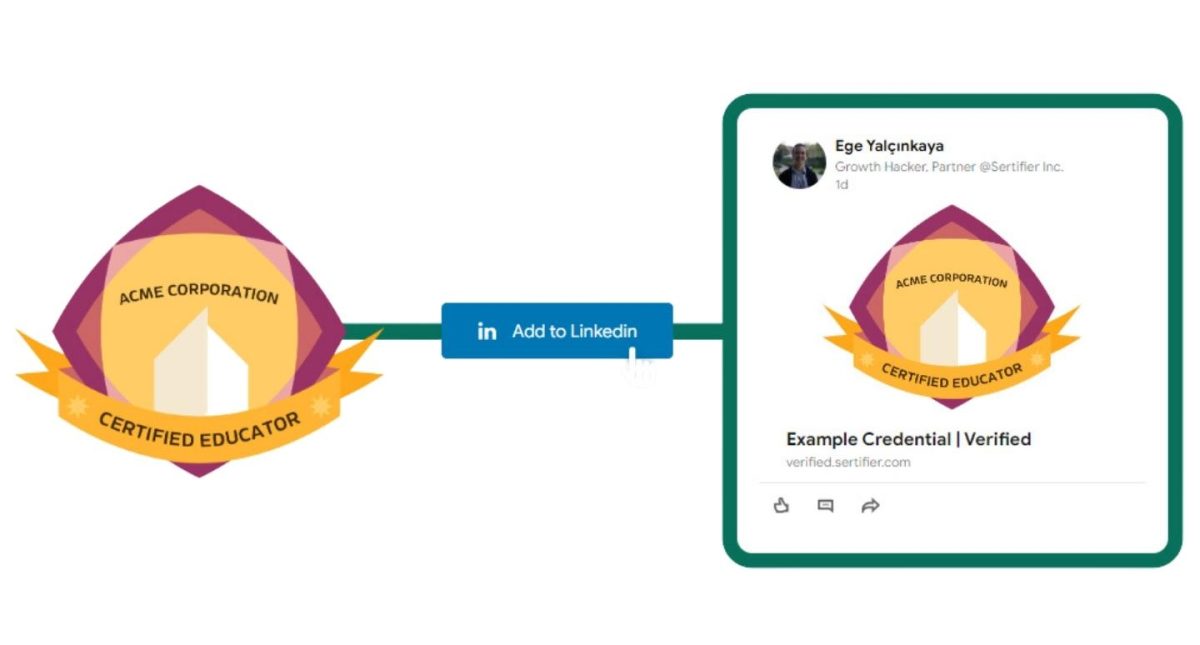
Add a badge to LinkedIn in four steps
1. Open the credential. Use the claim email or credential wallet supplied by the issuing organization.
2. Copy the verification details. Keep the credential name, issuer, issue date, credential ID and public credential URL ready.
3. Add the certification. On LinkedIn, open your profile, choose “Add profile section,” open “Recommended,” and select “Add licenses & certifications.”
4. Check the public result. Save the entry, open it from your profile and confirm that the verification URL resolves to the intended credential.
To get a LinkedIn digital badge, follow these steps:
- Check the eligibility requirements for the badge you want to earn, which may include taking a specific course or passing an exam.
- Once you’ve fulfilled the requirements, the issuing organization will typically send you a notification or email with instructions on how to claim your online badge.
- Follow the instructions to claim your badge, which may involve verifying your identity and linking your LinkedIn profile to the badge.
- After you claim your badge, log in to LinkedIn, open your profile, and click “Add profile section” in your introduction section.
- In the “Add profile section” menu, open the “Recommended” dropdown and select “Add licenses & certifications.”
- Fill in the details of your certification in the pop-up window, including the name, issuing organization, credential ID, and credential URL from your badge provider, then click “Save.”
- Once the badge is added to your LinkedIn profile, it will be displayed on your profile for others to see and verify. You can also share it as a post or private message on LinkedIn.
For a full walkthrough with screenshots and examples, see our guide on how to add a certificate in LinkedIn with digital badge examples.
For credential issuers
Issue LinkedIn-ready digital badges with Sertifier
Design, issue and track verifiable badges that recipients can share through a guided credential experience.
How do I edit or delete my LinkedIn badge?
1. Click the Me icon at the top of your LinkedIn homepage, then click View Profile.
2. Scroll to the Licenses & certifications section.
3. Actions you can take from here:
• Edit: Click the pencil icon next to the license or certification you want to change, update the details, and save.
• Delete: Click the pencil icon next to the license or certification you want to remove, then click “Delete license or certificate” and confirm.
Learn more about Sertifier digital badges and online sharing options
Request a demo and share your organization’s credentialing goals with us. A Sertifier specialist will help you evaluate the relevant workflow and plan options.
Does LinkedIn have digital badges?
Can I display badges on LinkedIn?
How do you add your badge to LinkedIn?
https://www.youtube.com/watch?v=e1bKCA5EkYE
Should I put LinkedIn badges on my resume?
How do I get a digital badge on LinkedIn?
Check the eligibility requirements for the badge you want to earn, which may include taking a certain course or passing an exam.
Once you’ve fulfilled the requirements, the issuing organization will typically send you a notification or email with instructions on how to claim your badge.
Follow the instructions to claim your badge, which may involve verifying your identity and linking your LinkedIn profile to the badge.
Once the badge is added to your LinkedIn profile, it will be displayed on your profile for others to see and verify.
Can anyone create a LinkedIn badge?
To create a LinkedIn badge, you need to have the authority and credibility to award certifications or recognition for a specific skill. This could be a university, a professional organization, a company, or another similar entity.
Once a LinkedIn badge has been created, it can be added to the LinkedIn profiles of individuals who have earned the badge. The badge verifies the individual’s skills and can be displayed on their LinkedIn profile as evidence of their expertise.


This blog post was a great introduction to the world of digital badges and how they can be used effectively on LinkedIn. The author explained everything in a clear and concise way, making it easy for me to understand the benefits of using badges to showcase my skills and achievements. I highly recommend this post to anyone who wants to improve their online presence and stand out in the job market
I found this blog post to be very informative and helpful. The author did an excellent job of explaining what digital badges are and how they can be used on LinkedIn. I especially liked the section on how to get a digital badge on LinkedIn, which was very detailed and easy to follow. Overall, a great post that I would recommend to anyone who wants to improve their LinkedIn profile.
I loved learning about Sertifier and how it makes sharing certificates and badges on social media platforms like LinkedIn, Facebook, and Twitter so simple. This is such a valuable resource in today’s digital age, and I can’t wait to start sharing my own verified credentials with just one click!
As someone who is just starting out on LinkedIn, I found this blog post to be extremely helpful. The author explained everything in a way that was easy to understand, and I learned a lot about the benefits of using digital badges to showcase my skills and achievements. I would definitely recommend this post to anyone who wants to get the most out of their LinkedIn profile.
This blog post was a great read. The author did an excellent job of explaining what digital badges are and how they can be used effectively on LinkedIn. I appreciated the practical tips on how to get a digital badge on LinkedIn, which I found very useful. Overall, a fantastic post that I would recommend to anyone who wants to improve their online presence.
I loved this blog post! The author provided a wealth of information on digital badges and how they can be used to showcase your skills and achievements on LinkedIn. I especially appreciated the section on how to get a digital badge on LinkedIn, which was very helpful. I would highly recommend this post to anyone who wants to make the most out of their LinkedIn profile.
Everybody wants to learn how to use linkedin digital badge so am I. Thank you Ege 🙂
linkedin badges are great, but I didn’t know it is that important in my career. Thank you very much for spreading information. <3
santhosh.m@gradsiren.com